

Introduction
Have you ever opened a website to find something important, only to close it because the page was taking too long to load? It happens more often than we think. When people visit a website, they want quick answers rather than a loading screen that seems to last forever.
This is where website speed optimization becomes important. A website that loads quickly allows visitors to explore information, understand your services, and take action more easily. For businesses, this can create a better first impression and reduce the obstacles between a website visit and a potential enquiry.
Website speed also plays a role in technical SEO. Although a fast website does not automatically rank at the top of Google, it helps create a better user experience and supports your overall SEO strategy.
Website speed describes how quickly a webpage displays its content and becomes usable. It is not just about how quickly the first part of a page appears. Visitors should also be able to scroll, click buttons, and interact with website elements without unnecessary delays.
Consider an online shopping website. If product images, prices, and descriptions appear quickly, customers can start comparing products almost immediately. However, if every click takes several seconds to respond, they may lose interest and visit another website.
Even a small difference in website performance can influence how visitors feel about a website and whether they decide to stay.
Website performance is an important part of technical SEO that website owners should not overlook. Google considers page experience signals, including Core Web Vitals, within its ranking systems. However, these signals work alongside other factors, such as content relevance, usefulness, and overall website quality.
1. It Supports Your SEO Efforts
Publishing useful content is important, but visitors also need to access it without difficulty. If your website is slow or difficult to navigate, the overall experience may suffer even when the information is valuable.
Improving website speed helps address performance issues that may affect user experience. When combined with relevant content, proper keyword targeting, a crawlable website structure, and quality backlinks, speed optimization contributes to a stronger SEO foundation.
2. It Helps Improve Core Web Vitals
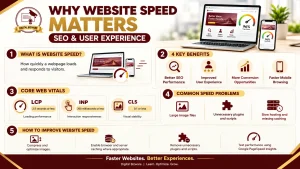
Google uses Core Web Vitals to measure important aspects of a website’s user experience. These metrics help website owners understand whether pages load quickly, respond to interactions, and maintain visual stability.
The three main Core Web Vitals metrics are:
For example, imagine clicking a navigation button and waiting for the page to respond. Alternatively, you might try to tap a link just as the content shifts down the screen. These frustrating experiences are the kinds of problems that performance improvements can help reduce.
3. It Supports a Technically Healthy Website
Search engines need to discover and process website pages before they can appear in search results. A well-maintained website makes this process easier by avoiding unnecessary technical obstacles.
Website speed improvements alone do not guarantee better crawling or indexing. However, addressing server errors, improving website stability, and resolving technical issues can support the overall health of your website.
4. It Makes Browsing Less Frustrating
Most people visit a website with a specific purpose. They might want to read a blog, compare courses, check prices, or contact a business.
When pages respond slowly, even simple activities can become frustrating. Visitors may leave before finding the information they need.
A responsive website creates a smoother browsing experience. People can move between pages, read content, and explore services without feeling that their time is being wasted.
5. It Can Increase Conversion Opportunities for Businesses
Website conversions include actions such as submitting an enquiry, registering for a course, booking an appointment, or completing an online purchase.
Consider someone searching for a digital marketing course. They visit an institute’s website to check the syllabus, course details, and placement support. If the pages load properly and the enquiry form works smoothly, contacting the institute becomes much easier.
Website speed alone cannot guarantee more leads or sales. Pricing, trust, content quality, and the offer itself also influence customer decisions. Nevertheless, reducing unnecessary delays removes one potential barrier to conversion.
6. It Makes Mobile Browsing Easier
A website may work perfectly on a desktop computer but struggle on a smartphone. Large images, heavy scripts, and poorly designed layouts can make mobile browsing unnecessarily slow.
This matters because people often visit websites while travelling, taking a break, or using mobile data with an inconsistent connection.
To improve the mobile experience, use responsive layouts, optimize images, avoid unnecessary scripts, and make sure buttons and menus are easy to use on smaller screens. Testing your website on an actual mobile device can also reveal problems that are easy to miss on a computer.
Key Benefits of Website Speed Optimization
Website speed improvements can make a noticeable difference in how people interact with your content and services.
Some important benefits include:
For businesses, the objective is not simply to achieve a perfect speed score. It is to build a website that works reliably and helps visitors accomplish what they came to do.
Common Website Speed Issues and Their Solutions
Before optimizing your website, identify the factors that are causing it to load slowly. Different problems require different solutions.
1. Large Images and Videos
High-resolution images can make a website look attractive, but unnecessarily large files increase the amount of data a browser must download.
Resize images to suitable dimensions and compress them without noticeably reducing quality. Image formats such as WebP and AVIF can help reduce file sizes. Videos should also be optimized and loaded thoughtfully rather than adding unnecessary weight to every page.
2. Too Many Plugins and Scripts
WordPress websites can become slower when they rely on excessive plugins or scripts that provide little value.
Review your installed plugins and remove those you no longer use. Check whether third-party widgets, animations, or tracking scripts are adding unnecessary delays.
Make changes carefully and test your website after each significant update to ensure that its functionality remains intact.
3. Hosting and Caching Problems
Your hosting service can influence how quickly your website responds to visitors. If your server takes too long to deliver a page, image compression alone may not solve the problem.
Choose a hosting plan that suits your website’s needs. Enable suitable caching to reduce repeated processing, and consider a content delivery network (CDN) if your website would benefit from serving content through geographically distributed servers.
How to Check Your Website Speed
You do not need to be an experienced developer to begin checking website performance. Several tools can help you understand where improvements may be needed.
Google PageSpeed Insights
Google PageSpeed Insights provides performance assessments and Core Web Vitals information when available. It also offers suggestions for improving page performance.
Google Search Console
Google Search Console includes a Core Web Vitals report that helps identify groups of URLs with performance issues. It is useful for monitoring website performance across multiple pages.
GTmetrix and Pingdom Tools
GTmetrix and Pingdom Tools provide additional performance measurements that can help you investigate loading problems and identify opportunities for improvement.
Start with the issues that have the greatest effect on your visitors. Make a change, test the page again, and compare the results. This approach is more useful than trying to fix every recommendation at once.
How AI Is Changing Website Performance Optimization
Artificial intelligence is giving digital marketers new ways to analyze website data and identify opportunities for improvement.
For example, AI-assisted tools can help summarize performance reports, identify recurring issues, and suggest areas that deserve further investigation. Marketers can use these insights to decide which problems to examine first.
However, AI-generated recommendations should not be accepted without checking them. A suggestion that works for one website may not suit another, and changes to scripts, caching, or website settings can sometimes create new problems.
The most effective approach is to combine AI-assisted analysis with practical testing and an understanding of technical SEO. This allows marketers to use automation while keeping real user needs at the centre of their decisions.
Frequently Asked Questions
1. Why does website speed matter for SEO?
Website speed contributes to page experience and is relevant to Google’s ranking systems. However, it is only one part of SEO. Content quality, relevance, technical accessibility, and other factors also influence search performance.
2. What is considered a good website loading speed?
For good Core Web Vitals performance, aim for an LCP of 2.5 seconds or less, an INP of 200 milliseconds or less, and a CLS score of 0.1 or less. These metrics help evaluate different aspects of loading, responsiveness, and visual stability.
3. Does website speed affect user experience?
Yes. Pages that load and respond quickly make it easier for visitors to find information, navigate between sections, and complete actions without unnecessary waiting.
4. Which tools can I use to test website speed?
Google PageSpeed Insights and Google Search Console are useful starting points. GTmetrix and Pingdom Tools can provide additional insights into page performance.
5. How can beginners improve website speed?
Start with simple improvements, such as compressing images, removing unnecessary plugins, enabling suitable caching, and checking mobile performance. If the website remains slow, investigate hosting performance and scripts that may delay page loading.
Conclusion
A slow website can turn a simple visit into a frustrating experience. People may leave before reading your content, exploring your services, or submitting an enquiry. That is why website speed deserves attention from both SEO professionals and business owners.
The good news is that you can make progress without changing everything at once. Identify the biggest performance problems, fix them one by one, and measure the results. Over time, these improvements can help create a more accessible website and support your wider digital marketing strategy.
If you want to understand technical SEO, website optimization, and other practical digital marketing skills, structured learning can help you build a strong foundation.
Explore the SEO course at Digital Bizware to learn more about SEO techniques and develop skills you can apply to real-world projects.